Cymera - Photo Editor Collage5.1.1.1
Continue to app
Free Version
Publisher Description

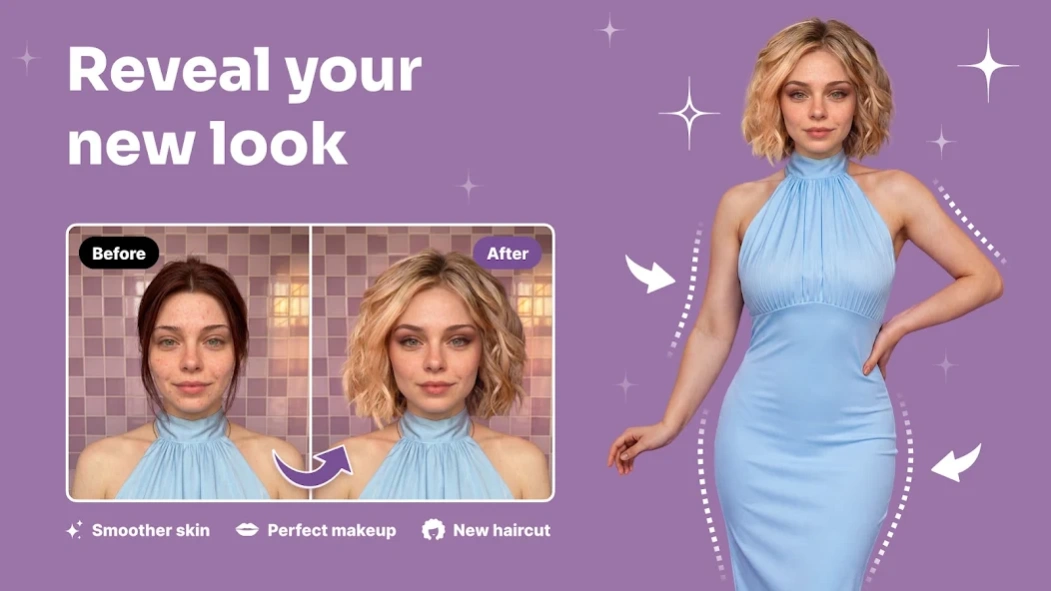


Photo Editor Collage Maker & Beauty Camera
Cymera: Photo Editor Collage - Create Selfies, Collages, And Beauty Edits!Cymera: Photo Editor Collage helps you capture selfies, edit portraits, make collages, and decorate photos with creative tools in one place.
Reshape Photos: Face Filters Selfie Camera gives you real-time selfie effects and beauty camera tools for smoother portraits. Beauty Camera & Pic Collage Maker also helps you combine multiple photos, create poster-style designs, and prepare clean edits quickly.
Creative Photo Editing Features:
📸Body Retouch: Filters For Pictures - Use body shaping, waist slimming, leg lengthening, and hip lift tools;
✨Photo Collage & Selfie Editor - Create collages, posters, and photo cards from gallery images;
💄Face Retouch: Pic Editor - Remove pimples, wrinkles, dark circles, and red eye;
🖼️Picture Collage Photo Editing - Combine up to 9 photos with different grid styles;
🤳Selfie Filters: Picture Editor - Try real-time filters, makeup effects, and favorite filter collections;
🎨Cymera: Photo Editor Collage - Crop, rotate, add mosaic, adjust brightness, and change contrast;
🌈Reshape Photos: Face Filters Selfie Camera - Enlarge eyes, adjust smile, slim the face, and reshape portraits;
💎Beauty Camera & Pic Collage Maker - Use high-resolution output for clean and clear photos;
Take selfies, retouch faces, reshape photos, and build collages!
Body Retouch: Filters For Pictures is helpful when you want to adjust body shape in a simple editor.
Photo Collage & Selfie Editor makes collage creation easy by letting you choose pictures from your gallery and instantly place them into layouts. You can also add text, texture, and photo-card details for posts, greetings, covers, and other social designs.
Simple Editing Flow:
📲Open Face Retouch: Pic Editor and choose a selfie or gallery photo;
🤳Use Selfie Filters: Picture Editor for real-time beauty looks;
🖼️Start Picture Collage Photo Editing when you want a grid or poster;
🎨Crop the image for socials, square layouts, covers, or thumbnail-style designs;
💄Apply skin glow, makeup, wrinkle removal, and dark circle cleanup;
📸Try body reshape tools when you want a different portrait look;
✅Save the photo in high quality when your edit is ready;
📸Beauty Camera And Selfie Tools:
Reshape Photos: Face Filters Selfie Camera includes skin makeup, face reshape, slim effects, wrinkle cleanup, pimple removal, and dark circle correction. Automatic face recognition helps with eye enlargement, smile adjustment, and face slimming, so selfie edits feel quicker. The app also includes real-time beauty camera effects for previewing your look before saving.
🌈Filters, Lenses, And Camera Options:
Selfie Filters: Picture Editor includes many filter styles such as vintage, natural, neon, lomo, film, sketch, fisheye, pastel, black and white, nation flags, lens flare, and light leak effects. The camera also includes 7 lenses, anti-shake, timer, touch shooting, out-focusing options, and silent mode for quieter photo capture.
🖼️Collage, Poster, And Easy Editing:
Picture Collage Photo Editing supports quick layouts from gallery photos, with grid options that can combine up to 9 images. Beauty Camera & Pic Collage Maker also includes crop tools for social ratios, blur background, text, stickers, and poster-style designs.
Make Every Selfie And Photo Edit Feel More Complete!
Cymera: Photo Editor Collage gives you beauty tools, camera effects, collage layouts, body editing, face retouching, and photo adjustments in one app. Face Retouch: Pic Editor keeps portrait cleanup simple, while Photo Collage & Selfie Editor helps turn everyday pictures into polished designs for sharing or saving.
About Cymera - Photo Editor Collage
Cymera - Photo Editor Collage is a free app for Android published in the Screen Capture list of apps, part of Graphic Apps.
The company that develops Cymera - Photo Editor Collage is Photo & Video Editors - Instant Solution. The latest version released by its developer is 5.1.1.1. This app was rated by 21 users of our site and has an average rating of 2.9.
To install Cymera - Photo Editor Collage on your Android device, just click the green Continue To App button above to start the installation process. The app is listed on our website since 2026-09-22 and was downloaded 1,189 times. We have already checked if the download link is safe, however for your own protection we recommend that you scan the downloaded app with your antivirus. Your antivirus may detect the Cymera - Photo Editor Collage as malware as malware if the download link to com.cyworld.camera is broken.
The company that develops Cymera - Photo Editor Collage is Photo & Video Editors - Instant Solution. The latest version released by its developer is 5.1.1.1. This app was rated by 21 users of our site and has an average rating of 2.9.
To install Cymera - Photo Editor Collage on your Android device, just click the green Continue To App button above to start the installation process. The app is listed on our website since 2026-09-22 and was downloaded 1,189 times. We have already checked if the download link is safe, however for your own protection we recommend that you scan the downloaded app with your antivirus. Your antivirus may detect the Cymera - Photo Editor Collage as malware as malware if the download link to com.cyworld.camera is broken.
How to install Cymera - Photo Editor Collage on your Android device:
- Click on the Continue To App button on our website. This will redirect you to Google Play.
- Once the Cymera - Photo Editor Collage is shown in the Google Play listing of your Android device, you can start its download and installation. Tap on the Install button located below the search bar and to the right of the app icon.
- A pop-up window with the permissions required by Cymera - Photo Editor Collage will be shown. Click on Accept to continue the process.
- Cymera - Photo Editor Collage will be downloaded onto your device, displaying a progress. Once the download completes, the installation will start and you'll get a notification after the installation is finished.
Program Details
System requirements
Operating systems
Android
Download information
File size
N/A
Total downloads
1,189
Pricing
License model
Free
Price
Version History
Here you can find the changelog of Cymera - Photo Editor Collage since it was posted on our website on 2014-03-05. The latest version is 5.1.1.1 and it was updated on Soft112 on 12 October, 2026. See below the changes in each version:
version 5.1.1.1
posted on 2026-09-22
version 4.5.7
posted on 2026-07-07
[V 4.5.7 update]
update
version 4.5.4
posted on 2026-03-26
[V4.5.4 update]
update
version 4.5.3
posted on 2026-03-26
[V 4.5.3 update]
update
version 4.5.2
posted on 2025-09-25
[V 4.5.2 update]
update
version 4.5.1
posted on 2025-07-29
[V 4.5.1 update]
AD Error patch & update
version 4.5.0
posted on 2025-03-10
[V 4.5.0 update]
Error patch & update
version 4.4.6
posted on 2025-02-18
[Update V4.4.6]
- change of company name
version 4.4.4
posted on 2024-12-17
[Update V4.4.4]
- Other bug fixes and performance improvements
version 4.4.5
posted on 2024-12-17
[Update V4.4.5]
- Other bug fixes and performance improvements
- Setting gallery permissions and responding to access errors
